Windows Subsystem for Android

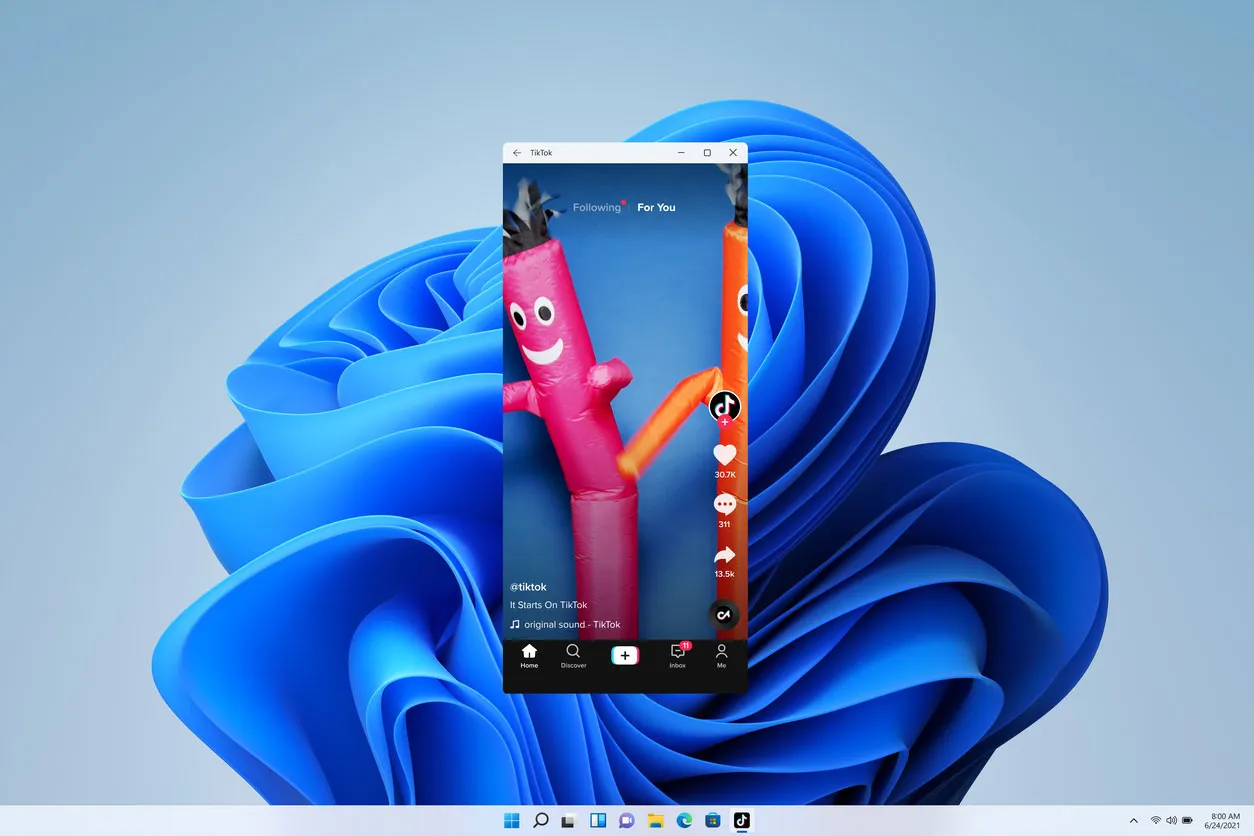
Windows Subsystem for Android (WSA) is a discontinued virtualization component for Windows 11 that enabled users to run Android applications natively on their PCs. Integrated with the Amazon Appstore, it allowed seamless installation and execution of mobile apps alongside traditional desktop software. Although support officially ended in March 2025, WSA represented a significant step in cross-platform compatibility, bridging the gap between mobile and desktop ecosystems.
windows

Gallery

About Windows Subsystem for Android

The Windows Subsystem for Android (WSA) is a powerful virtualization layer designed for Windows 11, enabling users to seamlessly run mobile applications alongside native desktop software. By integrating directly with the Amazon Appstore, this innovative platform bridged the gap between mobile and PC ecosystems. Although officially deprecated, WSA remains a notable example of cross-platform compatibility and mobile app integration. The Windows Subsystem for Android represented a monumental shift in how users interacted with mobile applications on desktop environments. Introduced by Microsoft exclusively for Windows 11, this sophisticated compatibility layer utilized virtualization technology to create a lightweight, isolated environment where Android applications could execute natively. Unlike traditional, resource-heavy emulators, WSA was deeply integrated into the host operating system, allowing mobile apps to behave much like native Windows programs. Users could launch these applications from the Start menu, pin them to the taskbar, and interact with them using familiar input methods, including a mouse, keyboard, touchscreen, and pen. At the core of this system was a partnership with the Amazon Appstore, which served as the primary distribution channel for compatible Android applications. This integration meant that users did not have to rely on third-party app stores to discover and install mobile software. However, for power users and developers, WSA also supported the sideloading of APK (Android Package) files. This feature opened up a vast library of applications that were not officially available on the Amazon Appstore, providing unparalleled flexibility and access to the broader Android ecosystem. From a technical standpoint, the Windows Subsystem for Android was an engineering marvel. It relied on a virtual machine that ran a specialized version of the Android operating system. This virtual environment was meticulously optimized to minimize overhead while maximizing performance. It included a custom Linux kernel and relied on the Intel Bridge Technology to translate ARM-based application instructions to the x86 or x64 architecture used by most Intel and AMD processors. This translation process happened in real-time, allowing apps designed for mobile phones to run smoothly on high-performance PC hardware. Furthermore, WSA was designed with productivity and multitasking in mind. Android applications were not confined to a single mobile-sized window; instead, they were fully resizable. Users could snap them to the sides of their screens, maximize them to full screen, or run them in free-floating windows. The subsystem also facilitated file system integration, allowing Android apps to access files stored on the Windows host machine, which was essential for productivity applications and media management. Developers were particularly drawn to the platform's debugging capabilities. By connecting Android Studio to the local WSA instance, developers could test their applications in a true desktop environment without needing physical mobile devices. They could evaluate how their apps handled window resizing, different input methods, and varying screen resolutions. This direct feedback loop was invaluable for optimizing mobile applications for larger displays, a growing trend as foldable phones and tablets gained popularity. Additionally, the subsystem supported essential hardware peripherals, granting Android apps access to the PC's camera, microphone, and network connection, further blurring the lines between a mobile and desktop experience. Despite its technological achievements and the excitement surrounding its release, the Windows Subsystem for Android had a relatively short lifespan. In early 2024, Microsoft announced that it would be deprecating the project, with official support and updates officially ceasing on March 5, 2025. This decision was driven by various factors, including the challenges of maintaining compatibility across a rapidly evolving Android ecosystem and limited adoption among the general user base. While the official experiment has concluded, the legacy of WSA lives on in the broader conversation about cross-platform application development and the ongoing desire to unify mobile and desktop computing experiences. It remains a fascinating case study in how far virtualization technology can be pushed to merge fundamentally different operating systems.

Features

Runs Android applications natively on Windows
Integrates directly with the Amazon Appstore
Supports manual APK sideloading for external apps
Enables free-form resizable application windows
Allows full mouse, keyboard, touch, and pen input
Shares local files between Windows and Android environments
Provides hardware access to PC camera and microphone
Offers network connectivity sharing with the host PC
Supports developer debugging via Android Studio
Features seamless integration with the Windows Start menu and taskbar

System Requirements

Minimum Requirements

CPU

Intel Core i3 8th Gen, AMD Ryzen 3000, or Qualcomm Snapdragon 8c (or newer)

Memory (RAM)

8 GB

Storage

10 GB available space

Write a Review

Reviews are moderated. Your review will be published after being approved by an administrator.

Have an account? Log in to post a review, or continue below with your name and email.

Share what you like or dislike about this emulator. Maximum 1000 characters.

Your email won't be published publicly.

Ratings & Reviews

No reviews yet

Be the first to review Windows Subsystem for Android.

Windows Subsystem for Android

Download Windows Subsystem for Android

Get the latest version of Windows Subsystem for Android and start using it right away.
Latest Version
2407.40000.4.0
Added
Mar 6, 2025
Download Now
1.4 GB
Free
Safe & Virus-Checked

Related Software

Game Loop

Game Loop

GameLoop, developed by Tencent, is a robust Android emulator designed for Windows, enabling users to enjoy popular mobile games such as PUBG Mobile, Call of Duty: Mobile, and Pokémon UNITE on their PCs. It enhances the gaming experience by offering precise controls, high frame rates, and access to a vast library of games.
Smart Gaga

Smart Gaga

SmartGaGa is a top-tier Android emulator for PC, perfect for gaming enthusiasts. It excels in running high-performance FPS games like PUBG Mobile and Free Fire with stunning graphics and smooth gameplay. Its user-friendly interface, custom keymapping, and multi-instance support make it a favorite among gamers.
BlueStacks

BlueStacks

Bluestacks is a leading Android emulator that allows users to run Android apps and games on Windows and Mac computers. It offers advanced features like custom key mapping, multi-instance support, and high frame rate gameplay, making it ideal for gamers and app enthusiasts. With Bluestacks, enjoy the full potential of Android applications on a larger screen with enhanced performance.
Ant Emulator

Ant Emulator

Ant Emulator is a versatile Android emulator designed for running Android apps and games on your PC. It delivers smooth performance even on low-end hardware, making it accessible for users with less powerful systems. With customizable controls, multi-instance support, and compatibility across various Android versions, it’s perfect for gamers and developers alike. Its seamless integration with Google services ensures a hassle-free experience for all your favorite apps and games.
Game Loop Chinese

Game Loop Chinese

GameLoop Chinese is a dedicated version of the GameLoop emulator for the Chinese market, developed by Tencent. It offers faster performance and quicker updates compared to the global version, supporting Android 4.1 and 7.1. This emulator is ideal for running Android games and applications on Windows PCs, with features like custom keymapping, multi-instance support, and screen recording.